Account Subscriptions Management#
Introduction#
The Subscriptions Page allows users to efficiently manage their subscriptions and licenses. This page provides a comprehensive overview of current subscriptions and allows for modifications or new purchases.
1. Subscription Overview Table#
This table displays a summary of the available subscription products, including:
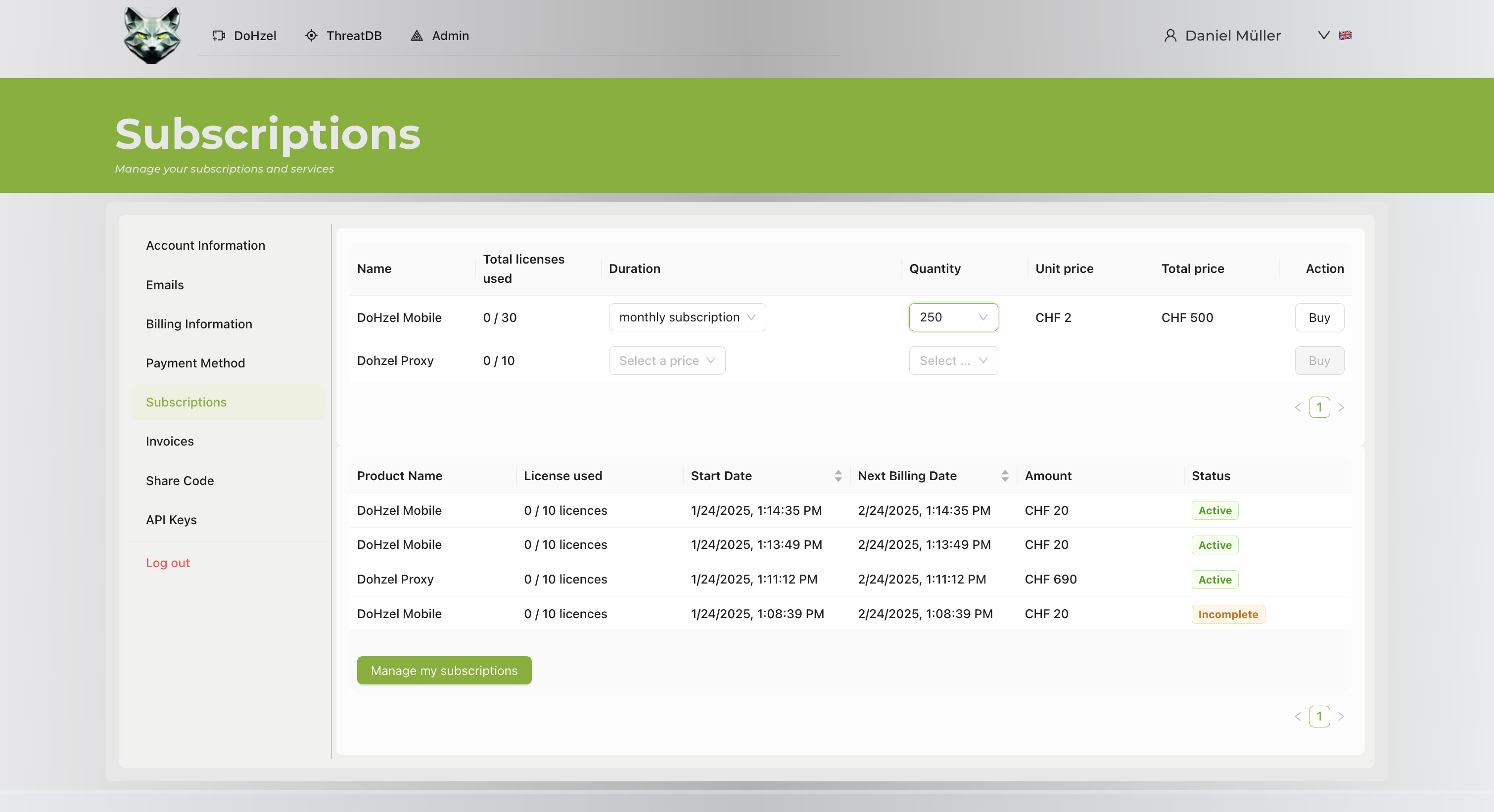
- Name: Indicates the subscription product (e.g., DoHzel Mobile, DoHzel Proxy).
- Total Licenses Used: Shows the number of licenses in use out of the total available.
- Duration: Dropdown to select the subscription duration (e.g., monthly subscription).
- Quantity: Editable field to select the number of licenses.
- Unit Price: Displays the price per license.
- Total Price: Automatically calculates based on the selected quantity and unit price.
- Action: "Buy" button to purchase selected licenses.
2. Subscription Details Table#
This section provides a detailed view of all subscribed products, displaying:
- Product Name: Lists all subscribed products.
- License Used: Indicates the number of licenses currently in use for each product.
- Start Date: Shows the subscription start date.
- Next Billing Date: Displays the next scheduled billing date.
- Amount: Shows the billing amount for each subscription.
- Status: Indicates the current subscription status (e.g., Active, Incomplete).
3. Manage Subscriptions#
- Manage my subscriptions: A button that redirects users to a detailed subscription management page.
User Actions#
Purchasing New Subscriptions#
- Navigate to the Subscriptions Page.
- Select the desired subscription product from the Subscription Overview Table.
- Choose the duration and quantity.
- Click the Buy button to confirm the purchase.
Managing Existing Subscriptions#
- Review the Subscription Details Table.
- Check the status and details of each subscription.
- Click Manage my subscriptions for advanced subscription management.
Notes#
- Ensure that selected subscription details (duration and quantity) are accurate before purchasing.
- Active subscriptions will display the next billing date and current status in real time.
- Incomplete subscriptions require attention to ensure service continuity.